
myAir™ by Resmed
ResmedMedical
4.011.54K Reviews
- Version
- Varies With Device
- Installs
- 1.00M
- Age Rating
- Everyone
Screenshots
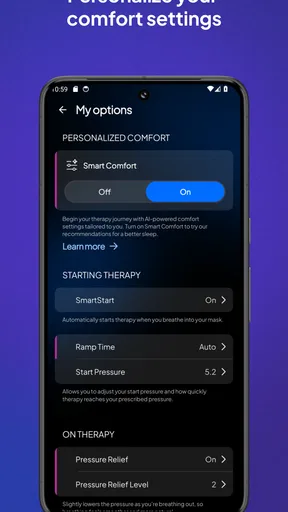
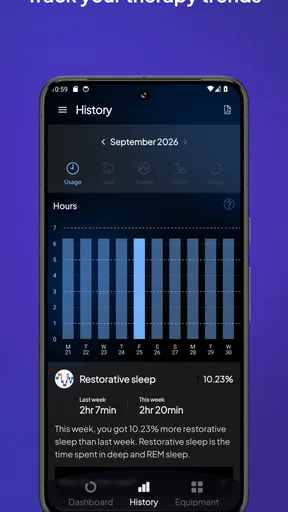
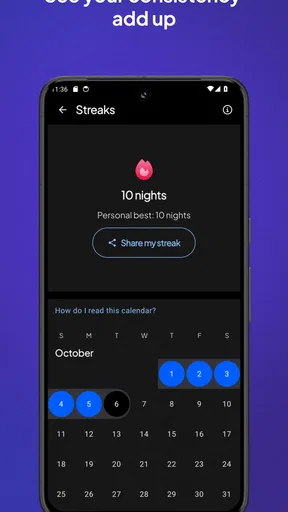
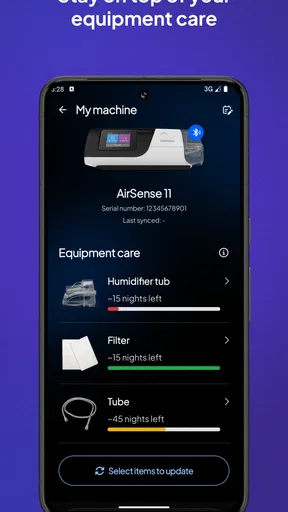
Our Review of myAir™ by Resmed
 Analysis by Appyee
I’d choose a sleep-therapy app by starting with one practical question: does it help me understand and stick with the equipment I actually use? For people using a compatible Resmed PAP device, myAir™ by Resmed is designed to make nightly therapy easier to follow, rather than act as a general sleep tracker. That distinction matters: it is most useful when your goal is to review your PAP routine, not to collect broad information about sleep habits.
MyAir is a free medical app from Resmed, and its focus is narrow in a helpful way. Instead of asking you to log bedtime routines or compare sleep stages, it brings attention to therapy measures such as usage, mask seal and events per hour. I find that focus more actionable than a graph full of sleep estimates when I’m trying to work out whether my PAP setup is going smoothly.
Choose it for therapy feedback, not a full sleep diary
The key decision is whether you use a Resmed CPAP machine and want a companion for understanding your treatment. If so, the daily score and the breakdown behind it can offer a quick morning check-in. If you are looking for an app to track general sleep patterns independently of PAP therapy, a conventional sleep diary or a broader sleep-tracking app may suit you better.
That difference also sets realistic expectations. A score is a summary, not a diagnosis or a verdict on how rested you should feel. I’d use it to spot questions and patterns—such as a mask-seal issue that appears repeatedly—not as a replacement for how I feel or for guidance from a clinician. The most useful habit is to look at the components, then decide whether there is a practical next step.
Where the focused approach pays off
MyAir’s strongest case is helping make a nightly routine more visible. When therapy is new, it can be hard to tell whether you are using the equipment consistently or which part of the setup deserves attention. Having usage, seal and events-per-hour information presented together gives you a more concrete starting point than relying on memory alone.
For example, if I woke up tired after a restless night, I would check the app before changing several things at once. If the displayed information points toward a mask-seal concern, I can pay attention to how the mask fits the next night and use the app’s tips as a prompt. Changing one thing at a time makes it easier to notice whether the adjustment seems to help, while avoiding the assumption that one score explains every bad morning.
Useful for routines, with sensible limits
The coaching and progress features are most valuable when they turn a concern into a manageable action. A suggestion about mask fit is more useful than a vague instruction to “sleep better,” and progress tracking can encourage consistency without requiring a detailed journal. I’d treat badges as optional encouragement: they may make routine use feel rewarding, but the underlying therapy matters more than collecting them.
There is also a trade-off to the app’s focused design. It centers on data from PAP therapy, so it cannot explain every reason someone might sleep poorly or feel unwell. A difficult night may involve factors outside the measurements shown in the app. If a concern persists, I would bring the relevant pattern to a healthcare professional rather than trying to solve a medical issue by chasing a higher score.
Compatibility is part of the decision
Before building a routine around it, make sure you use a Resmed machine that can connect with the app. MyAir is not a universal dashboard for every brand of PAP device, and it will be less useful if your equipment does not work with it. The app is available for Android and iOS, but the device connection—not just the phone—is the important part to consider.
Resmed released the app on April 17, 2018, and it has an Everyone age rating. It has a 4.1 average from around 35,000 ratings, with over 1 million installs. Those figures suggest it is widely used, but I would still judge it by fit: whether it connects to your machine, whether its summaries help you, and whether you prefer a focused therapy companion over a broader sleep tool.
Getting Started with myAir™
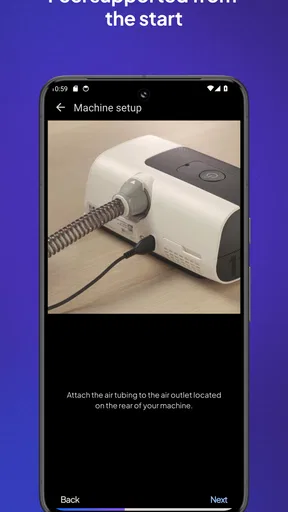
First off, setting up myAir™ by Resmed is a breeze. You just need to sync it with your Resmed CPAP machine, and you’re ready to roll. The app is available on both Android and iOS, so no worries about compatibility. It’s user-friendly, with a clean interface that doesn’t overwhelm you with too many options right off the bat.
Understanding Your Sleep Data
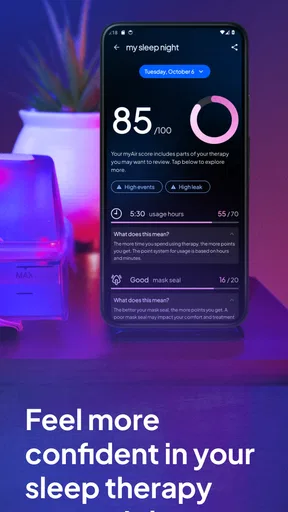
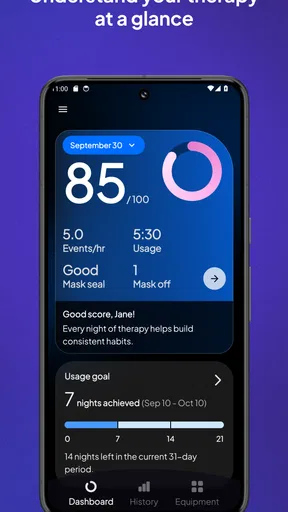
Once you’re all set up, the real magic begins. The app provides a ton of insightful data about your sleep. And when I say insightful, I mean it’s like having a sleep coach right in your pocket. You get a daily myAir score that rates your sleep quality. It’s like waking up to a report card every day, but in a good way!
The score takes into account various factors like usage hours, mask seal, and events per hour. Even if you’re not a data nerd, the app breaks it down into bite-sized chunks that are easy to digest. You know exactly what’s working and what needs improvement.
Personalized Sleep Tips
What I loved the most is the personalized coaching tips. The app doesn’t just dump data on you—it actually helps you interpret it. You’ll get tailored advice on how to improve your sleep quality based on your unique sleep patterns. It’s like having a handy guide to better sleep, tailored just for you.
These tips are practical and easy to implement. For instance, if your mask seal isn’t great, the app suggests adjustments or even recommends a different type of mask. It’s all about making your CPAP therapy as effective as possible.
Motivation to Stay on Track
Another cool feature of the app is its motivational aspect. It tracks your progress over time, and let me tell you, seeing those improvements can be a real confidence booster. It feels good to know that your efforts are paying off and that you’re taking steps towards better health.
The app also includes badges and achievements, which might sound a bit cheesy, but hey, a little gamification never hurt anyone. It’s a fun way to stay engaged and motivated to keep using your CPAP machine regularly.
Connectivity and Support
Now, let’s talk about connectivity. myAir™ seamlessly syncs with your CPAP machine via Bluetooth, ensuring that all your data is up-to-date. This connectivity is crucial because it means you’re always getting the most accurate and relevant information about your therapy.
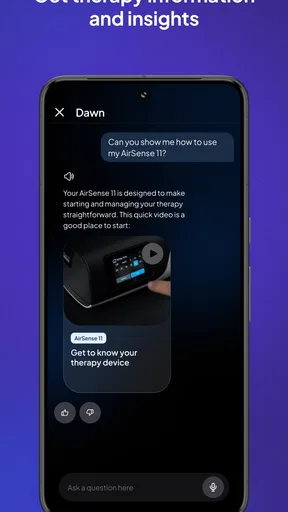
If you ever run into issues, the app offers robust support. There’s a comprehensive FAQ section, and if you need more help, contacting customer support is straightforward. They genuinely seem to care about helping you get the most out of your therapy.
Making it part of an ordinary morning
A realistic use for me would be checking the previous night’s summary while getting ready for work, rather than opening the app repeatedly during the day. If one measure looks different from my usual pattern, I’d note it and see whether it happens again. That keeps the app useful without letting a daily score take over the morning or shape my mood before I’ve even had breakfast.
For someone adjusting to PAP, a short review can also help turn vague discomfort into a clearer question. Instead of saying “the machine felt wrong,” you might notice that the seal information changed on nights when the mask shifted. That does not prove the cause, but it gives you a specific detail to discuss with a clinician or use when checking the fit. I would avoid making major therapy changes on my own based only on an app prompt.
Another useful approach is to check the phone connection before assuming the therapy data is missing. Bluetooth syncing depends on the device and phone communicating, so a delayed update may be a connection matter rather than evidence that the machine did not record a night. I’d first confirm the usual pairing is active and give the app a chance to refresh; if the problem keeps happening, the support options are more appropriate than repeatedly reinstalling or changing settings at random.
How it compares with other ways to track sleep
Compared with a paper log, myAir can save the effort of remembering and writing down therapy details every morning. A paper notebook still has an advantage when you want to record context the app’s measures do not capture, such as travel, a late meal, or how you felt on waking. I’d use the app for the PAP-related picture and a brief note elsewhere only when there is a reason to track something beyond it.
Compared with general sleep apps, its strength is not breadth but connection to Resmed therapy. Broad trackers may be a better match for someone focused on bedtime habits or sleep routines across different equipment. MyAir makes more sense when the question is, “How did my PAP use go?” If you use a different device brand, a tool designed for that equipment—or a simple clinician-guided record—may be more practical than trying to make this app fit.
It also differs from simply checking the machine itself: the app gathers the therapy information into a phone-based view and adds explanations and encouragement. That convenience is worthwhile only if you like reviewing feedback. If seeing scores makes you anxious, or if you would rather keep treatment details between yourself and your care team, a less frequent review or a non-app routine may feel healthier. The app should support therapy, not create pressure to achieve a perfect-looking result every night.
What to expect when starting
At the beginning, I would focus on learning what each displayed measure refers to instead of trying to optimize everything immediately. A few mornings of checking the same areas can make the layout easier to understand and show what seems typical for your own routine. If you are new to PAP, ask your clinician which changes are appropriate to make yourself and which should be discussed first; practical app coaching is not a substitute for that distinction.
It is also worth deciding how often you want to look. Daily feedback can be reassuring for some people, especially while establishing a routine, but it can become noise if you inspect every fluctuation. A weekly glance may be enough for someone whose therapy feels stable, while a more frequent check can help someone notice a recurring mask-fit concern. The right cadence is the one that informs you without turning sleep into a performance test.
For a household where another person helps with equipment setup, the app can give both people a shared point of reference for discussing a recurring issue. Still, the person using the device should remain central to decisions: comfort, symptoms and professional advice matter alongside the displayed summary. I would not treat the app’s coaching as an instruction to buy a different mask without first considering fit, clinical guidance and the available options for the particular setup.
Who should choose it—and who may not need it
I’d recommend trying it if you use a compatible Resmed PAP machine, want a quick way to review therapy, and find feedback motivating rather than stressful. It is especially appealing to someone who is starting treatment and would benefit from a simple routine: sync, review the night, notice a recurring issue, and bring useful questions to the right person.
I’d skip it if your equipment is not compatible, if you only want general sleep tracking, or if app scores make you fixate on nightly variation. It is also not the right tool for diagnosing sleep problems or deciding independently that treatment settings should change. In those cases, a general sleep diary, the device maker’s appropriate companion, or direct conversation with a health professional is a better fit.
Final Thoughts
All in all, myAir™ by Resmed is a solid companion for anyone using a CPAP machine. It’s intuitive, informative, and genuinely helpful. Whether you’re a seasoned CPAP user or just getting started, this app can make a real difference in understanding and optimizing your sleep.
So, if you’re looking to take your sleep therapy to the next level, give myAir™ a shot. It’s like having a sleep coach in your pocket, guiding you towards restful nights and energized days. Sweet dreams!
A practical final check before installing
My final recommendation is to treat the app as a companion to your routine, not as the routine itself. Check that your Resmed device is the one you intend to use with it, decide whether regular feedback would genuinely help, and keep clinical questions for your care team. The app is free, so trying it carries no purchase decision, but your time and attention still matter: keep it if its summaries help you act calmly and consistently, and step back if the scores add worry without useful insight.
Privacy and Permissions
See what permissions an app requests and how it handles your data.
- Location
- precise location (GPS and network-based)
- Photos/Media/Files
- read the contents of your USB storage, modify or delete the contents of your USB storage
- Storage
- read the contents of your USB storage, modify or delete the contents of your USB storage
- Wi-Fi connection information
- view Wi-Fi connections
- Other
- view network connections, pair with Bluetooth devices, access Bluetooth settings, full network access, run at startup, prevent device from sleeping
Verdict
Strengths of myAir™ by Resmed
- User-friendly interface simplifies navigation.
- Comprehensive sleep data tracking.
- Seamless integration with ResMed devices.
- Customizable notifications and reminders.
- Secure data handling and privacy features.
Limitations of myAir™ by Resmed
- Limited functionality without compatible devices.
- Requires consistent internet connection.
- May drain battery with constant use.
- Occasional syncing issues reported.
- Not available in all regions.
Other Releases by Resmed
View All
NightOwl Companion
Medical4.8
Similar Picks in This Category
View All
WebMD: Symptom Checker
WebMD, LLC4.1

Microphone Amplifier
DOSA Apps4.2

Anatomy Learning - 3D Anatomy
3D Medical OU4.5

Period Tracker and Calendar
SimpleInnovation4.9

GoodRx: Prescription Coupons
GoodRx4.8

CVS Health
CVS Pharmacy4.5
Frequently Asked Questions
What is myAir™ by ResMed and how does it work?
myAir™ by ResMed is a companion app designed for individuals using ResMed sleep apnea devices. It provides users with detailed insights into their sleep patterns and therapy progress. The app syncs with your CPAP machine to deliver personalized data, allowing you to monitor your treatment, track sleep quality, and get tips for improving your sleep habits.
Is myAir™ compatible with all CPAP machines?
myAir™ is specifically designed to work with ResMed's AirSense™ 10, AirCurve™ 10, and AirMini™ devices. Users must ensure their CPAP machine is compatible with the app to take full advantage of its features. Compatibility can be confirmed in the device's user manual or by contacting ResMed support.
Is an internet connection necessary to use myAir™?
Yes, an internet connection is required for myAir™ to sync data from your CPAP machine. The app relies on Wi-Fi or mobile data to update your therapy information and provide accurate, real-time insights. Without an internet connection, some features might be inaccessible or delayed.
Does myAir™ store personal data securely?
myAir™ prioritizes user privacy and security. The app employs industry-standard encryption to protect personal and therapy data. Users can access their information securely through the app, and ResMed ensures that data is not shared with third parties without consent. Reviewing the privacy policy is recommended for further details.
What features does myAir™ offer to improve sleep therapy?
myAir™ provides a range of features to enhance sleep therapy, including sleep score tracking, personalized coaching tips, and detailed reports on usage, mask seal, and events per hour. These tools help users understand their therapy effectiveness and make necessary adjustments to improve overall sleep quality.
